Train Rush 3D Arcade
Reviews
Train Rush 3D Arcade targets players who want a quick, uncomplicated racing session in a browser. Its strengths are clear: themed 3D tracks, multiple train appearances, and a control scheme simple enough for younger players. The scoring loop, built on coins, power-ups, and best times, gives each track a reason to be replayed. The limitation is equally clear: there is no multiplayer, no deep customization, and no mechanical complexity beyond steering and collecting. It works best as a casual time-filler rather than a long-term competitive game.
Description
Track Design and Visual Style
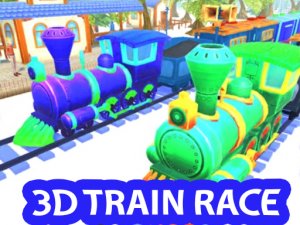
Each track in Train Rush 3D Arcade carries its own theme, and the visual variety is part of what keeps repeated runs from feeling identical. Bright 3D environments surround the rails, and the difficulty curve is built into track layouts rather than separate modes. Early tracks give you room to react; later ones tighten the spacing between barriers and demand earlier steering inputs. The finish line on every track is the only progression gate, so clearing a level depends on survival and timing rather than a score threshold.
Controls and Core Loop
You pick a train and a track from the main menu, then steer left or right along the rails using on-screen controls. The core loop is simple: avoid barriers that slow you down, grab coins and power-ups to raise your score and speed, and cross the finish line to unlock the next track. Because power-ups affect speed, collecting them changes how quickly obstacles arrive, so the decision to chase a pickup is also a decision about risk. Responsive controls and clear instructions mean new players can start without a tutorial.
Trains, Rewards, and Replay Value
Multiple train options each have a unique appearance, giving you a cosmetic reason to switch between runs. Coins and collectibles feed back into your score, and because each track has its own best time and score to beat, there is a reason to replay levels you have already cleared. The game runs in most web browsers without a download, which makes short sessions practical.
Who This Suits
The design leans casual: no violent content, no complex rules, and a family-friendly tone. Younger players and anyone looking for a few minutes of arcade racing will find the controls approachable. Players who want deep customization or competitive multiplayer will not find those here, since the game is built around single-run score chasing on fixed tracks.








Editorial Notes