Grass Harvest Simulator
Farming Arcade Simulation Casual Browser Game
Grass Harvest Simulator
116
Developer: Pixel Queen Games
Published: 1742832000
Updated: 2026-10-01

Reviews

Grass Harvest Simulator delivers a straightforward harvest-sell-upgrade cycle in a colorful, open map. Its strengths are accessibility and clarity: on-screen controls, a visible bale meter, and a marked sell point keep the focus on route planning. The upgrade system for speed and capacity adds light progression. It suits players seeking a relaxed, family-friendly arcade game rather than depth or competition. The main limitation is repetition, as the core loop changes little beyond upgrades.

Description

Core Loop and Objective

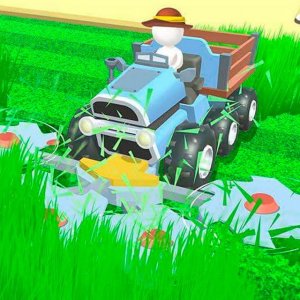
Grass Harvest Simulator is a casual arcade game released in late 2022. It runs in a web browser on computers, phones, and tablets without any download. Players steer a small mower across a bright, colorful map covered with patches of grass. Driving over grass collects it and turns it into bales, which fill a meter on the left side of the screen. When that meter is full, the player must guide the mower to a marked selling point. Reaching that zone exchanges the bales for in-game currency and empties the mower so harvesting can continue.

Controls and Moment-to-Moment Play

Steering uses on-screen arrow buttons, which keeps the game playable on touchscreens and with a mouse. The controls are deliberately simple, so new players can start mowing within seconds. The challenge comes from route planning rather than dexterity: grass patches are spread across open areas, and the bale meter limits how much can be carried before a trip to the sell point is required. Players decide when to keep mowing and when to cash in, balancing time spent driving to the sell zone against the risk of wasting a full load.

Upgrades and Progression

Coins earned from selling bales can be spent on upgrades shown as icons on the sides of the screen. These upgrades improve the mower's speed and capacity, meaning faster mowing and more bales carried per trip. Because upgrades become available as money is earned, the game builds a simple progression loop: harvest, sell, upgrade, and harvest more efficiently. The map's colorful, open design encourages players to explore and find efficient routes between grass patches and the selling point.

Presentation and Accessibility

The game is designed for all ages with a calm, rewarding pace. A clear bale meter tracks progress, and the selling point is always visible on the map, so players are never lost. The layout adapts to different screen sizes and includes a full-screen mode. There are no disruptive ads or pop-ups during play, which keeps sessions focused. The family-friendly setting and straightforward rules make it easy for younger players or anyone looking for a low-pressure arcade experience to pick up and enjoy.


Editorial Notes

Compatibility

This H5 game runs smoothly on:
• Desktop computers (Windows / Mac) • Mobile phones (iPhone / Android)
• Tablets (iPad / Android)
🌐 Best experienced with Chrome, Safari, or Edge

Faq

Is Grass Harvest Simulator free to play?
Yes. Grass Harvest Simulator is a free HTML5 browser game. It does not require a download, installation, or account. You open it in a web browser on a computer, phone, or tablet and start playing immediately. The game is supported by its simple design and does not include disruptive ads or pop-ups during play.
What devices can run Grass Harvest Simulator?
The game is optimized for different screen sizes and works on computers, phones, and tablets through a web browser. It includes a full-screen mode for a more focused view. Because it is an HTML5 game, no separate app or download is needed. Performance depends on your browser and device, but the simple 2D-style graphics are designed to run smoothly on most modern hardware.
How do I earn coins in Grass Harvest Simulator?
Coins are earned by selling grass bales. Drive the mower over grass to collect it, which fills the bale meter on the left side of the screen. Once the meter is full, navigate to the marked selling point on the map. Reaching that zone sells the bales and adds coins to your balance. The mower is then emptied, and you can continue harvesting.
What upgrades are available in Grass Harvest Simulator?
Upgrades are purchased with coins earned from selling bales. They appear as icons on the sides of the screen. The two upgrade types mentioned are mower speed and carrying capacity. Speed upgrades let you mow and travel faster, while capacity upgrades let you carry more bales before needing to sell. Prioritizing speed first is often recommended for quicker collection.
Is Grass Harvest Simulator suitable for children?
Yes. The game is designed for all ages and has a calm, rewarding loop with no graphic content. It teaches basic planning and resource management in a friendly setting. The simple controls and clear objectives make it easy for younger players to understand. There are no disruptive ads or pop-ups, so the experience stays focused on mowing, selling, and upgrading.
Does Grass Harvest Simulator have multiplayer or online features?
No. Based on the available information, Grass Harvest Simulator is a single-player browser game. It does not include multiplayer modes, online leaderboards, or social features. The experience is self-contained: you control one mower, harvest grass, sell bales, and buy upgrades. Any competition comes from improving your own efficiency and route planning rather than playing against others.