模板变量错误

发现 2 个未定义变量,已自动替换为 ERROR_VAR

解决方案: 请将模板中上述变量替换为 {$ERROR_VAR}

当前状态: 页面已自动修复,所有未定义变量值显示为 ERROR_VAR,请联系管理员处理

3D Precision Archery Simulator
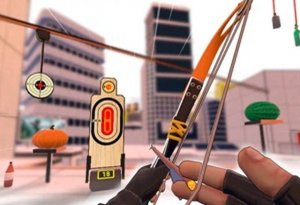
3D Precision Archery Simulator

Updated: 2026-07-17
| Point And Shoot , Archery , Physics , Casual , Browser , 3D

Review

3D Precision Archery Simulator excels at delivering a realistic archery experience in a browser. The physics engine accurately simulates arrow trajectory, wind, and gravity, making each shot feel meaningful. The gradual difficulty curve keeps the game accessible for beginners while offering enough depth for experienced players. Optimized for both desktop and mobile, it's easy to pick up and play anytime. The variety of environments and objectives prevents monotony, and the reward system encourages replay. A solid choice for casual gamers looking for a skill-based challenge.

About This Game

Game Introduction

3D Precision Archery Simulator brings the art of archery to your browser with a focus on realistic physics. Players take on the role of an archer who must hit targets at various distances while accounting for environmental factors like wind and gravity. The game is designed to be accessible for newcomers while offering enough depth to keep experienced players engaged. Each session presents a fresh set of conditions, encouraging repeated play to improve accuracy and consistency. The 3D environment provides a sense of depth and realism, making each shot feel unique. Because it runs directly in a web browser, there is no need for downloads or installations, allowing instant access. The combination of skill-based aiming and environmental variables creates a satisfying experience that rewards patience and precision.

How to Play

Players use their mouse or touch input to aim at targets displayed in a 3D environment. A reticle or crosshair indicates the current aim point. Before releasing the arrow, players must consider the distance to the target, the effect of gravity on the arrow's trajectory, and any wind that may push the arrow off course. Some scenarios may include moving targets or obstacles that require careful timing. The controls are intuitive and designed for quick, browser-based play. Early stages are simpler and help players learn the basic mechanics, while later stages introduce more complex conditions that require greater precision and strategic thinking.

Game Features

3D Precision Archery Simulator includes several features that enhance the gameplay experience. The game offers clear progression with objectives that gradually become more demanding, keeping the challenge balanced. It is optimized for both desktop and mobile browsers, so players can enjoy it on a variety of devices. Different stages and environments keep each session feeling fresh and prevent monotony. Customization options may allow players to adjust the experience to suit their personal preferences. A reward system encourages players to complete objectives and beat their own records, adding replay value. The game includes a variety of modes and scenarios typical of the point and shoot genre, ensuring there is always something new to try.

Tips for Success

Observe the environment before taking a shot. Patience often leads to better results than rushing. Learn from each miss and adjust your aim or timing on the next attempt. Focus on completing the primary objective before trying to earn extra rewards. When the difficulty increases, stay calm and avoid rushed mistakes. Use the early stages to practice your aim and understand how the physics work without added pressure. Combining careful observation with smart decisions will help you improve over time.

✅ Compatibility & Testing

• Desktop (Windows 11, macOS Ventura)
• Mobile (iPhone 14, Samsung Galaxy S23)
• Tablet (iPad Pro, Android tablet)
✅Supported browsers: Chrome, Safari, Edge, Firefox (latest versions)
❌ Not supported: Internet Explorer, older browser versions

Faq

Is 3D Precision Archery Simulator free to play?
Yes, the game is completely free to play. It runs in a web browser, so there are no upfront costs or subscription fees. Some optional in-game purchases or ads may be present, but the core experience is available at no charge.
Can I play 3D Precision Archery Simulator on my phone or tablet?
Yes, the game is optimized for mobile browsers. You can play on smartphones and tablets using touch controls. The interface adapts to different screen sizes, ensuring a smooth experience on both small and large devices.
Do I need to create an account to save my progress?
No account is required to play. Progress may be saved automatically in your browser's local storage, but this depends on the specific implementation. For cross-device progress, some versions may offer cloud saving with an optional account.
How does the wind affect my shots in the game?
Wind is a dynamic environmental factor that pushes the arrow off its intended path. You can see wind indicators on the screen before each shot. Adjust your aim to compensate for wind direction and strength to hit your target accurately.
Are there different difficulty levels in 3D Precision Archery Simulator?
The game features a gradual progression system. Early stages are easier and help you learn the basics, while later stages introduce more challenging conditions like moving targets, stronger wind, and longer distances. This natural difficulty curve accommodates players of all skill levels.
Can I compete with friends or see leaderboards?
Some versions of the game may include leaderboards or score sharing features. These allow you to compare your best scores with other players. Check the game menu for options to view global or friend-based rankings.

💬 Comments

0 comments
U
User
Loading comments...

⚡ You May Also Like