Hue Harmony Reflex

Puzzle Color Matching Arcade Reflex Casual Family-Friendly
Hue Harmony Reflex
59
Developer: Ice Nova Digital
Updated: 2026-10-01

Reviews

Hue Harmony Reflex strips the color-matching idea down to one input and one fail state, which makes it easy to understand and hard to master. The randomized sequences and endless structure give it strong replay value for short sessions. Its main limitation is variety: the mechanic never changes, so players who want new rules or modes may lose interest. Best suited to casual players who enjoy chasing personal high scores.

Description

Matching Under Pressure

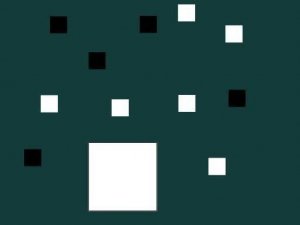
Hue Harmony Reflex places a single large square at the center of the screen. Smaller colored squares drift toward it from multiple directions. Your only control is a tap or click that cycles the central square through a fixed set of colors. The goal is simple: set your square to the same color as the incoming block before contact. A correct match merges the block and adds points. A mismatch triggers a collision and ends the session immediately. There are no power-ups, no lives, and no second chances within a run.

How Difficulty Rises

Early rounds give you generous time to read the incoming color and tap through the cycle. As your score climbs, blocks arrive more often and from several angles at once. Later stages force you to track one block while anticipating the color of the next. The cycle order stays consistent, so the challenge comes from speed and multitasking rather than new rules. This gradual ramp rewards focus and short practice sessions more than raw reaction time alone.

Clarity as a Design Choice

Every square uses a bright, distinct color with clear outlines against a neutral background. That contrast matters because the entire game depends on split-second color recognition. The palette stays varied but family-friendly, and the layout avoids visual clutter. Nothing on screen competes with the blocks you need to read. [IMG_1]

Endless Format and Replay

Color sequences are randomized each run, so no two sessions unfold the same way. There are no levels or fixed endpoint. You keep playing until a mismatch ends the run, then try to beat your previous high score. That structure fits both short breaks and longer sessions, and it gives the game a personal challenge loop rather than a campaign to complete.

Editorial Notes

Compatibility

This H5 game runs smoothly on:
• Desktop computers (Windows / Mac) • Mobile phones (iPhone / Android)
• Tablets (iPad / Android)
🌐 Best experienced with Chrome, Safari, or Edge

Faq

How do I control the central square in Hue Harmony Reflex?
A single tap or click cycles your central square through its available colors. There is no dragging or swiping. You tap repeatedly until the square shows the color you need, then wait for the incoming block to reach you. The entire control scheme is one input.
Does Hue Harmony Reflex have levels or a story mode?
No. The game uses an endless format with no levels, chapters, or fixed endpoint. Each run continues until you make a mismatch. Your only progression marker is your high score, which you try to beat across repeated attempts. This keeps sessions short and repeatable.
Is there a way to slow down the game or pause it?
The input does not mention a pause or slow-motion feature. Difficulty increases automatically as your score rises, and the pace never resets within a run. If you need a break, you would have to end the session and start fresh later. Plan short sessions if the speed becomes intense.
What happens if I match the wrong color?
A mismatch causes a collision that immediately ends the current session. There are no extra lives or recovery mechanics described. Your score at that moment becomes your final result for the run. This makes every color decision matter, especially once multiple blocks approach from different directions.
Is Hue Harmony Reflex suitable for children?
The game is tagged Family-Friendly and uses bright, distinct colors with a neutral background and no violent or mature content. The core task is recognizing colors and tapping to match them. Younger players may find the later speed challenging, but the concept itself is simple and accessible.
Can I play Hue Harmony Reflex with a keyboard or controller?
The input only describes tapping or clicking to cycle colors. No keyboard or controller support is mentioned. On a computer, that likely means mouse clicks or taps on a touchscreen. On mobile, tapping is the natural input. Check your specific platform for any additional control options.