Coach Parking Challenge
Reviews
This browser-based simulation succeeds by making a mundane task genuinely compelling. The core loop of maneuvering a large coach into progressively tighter spaces is both relaxing and challenging. The gradual difficulty curve is well-paced, and the immediate feedback on each attempt encourages methodical improvement. The controls feel appropriately weighty, and the audio cues are a helpful touch. It is an excellent choice for a short, focused gaming session that tests patience and spatial reasoning.
Description
Core Gameplay Loop
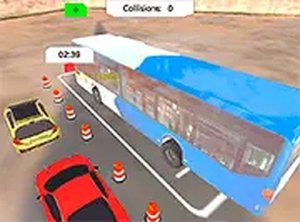
At its heart, this simulation focuses on the precise art of maneuvering a large passenger vehicle. Each session begins with the coach positioned at a starting point within a parking lot. An on-screen indicator shows the location of the designated parking spot. The player's task is to navigate the vehicle through the lot, avoiding static obstacles like low walls and other parked cars, and align the coach within the marked boundaries of the target space. Success is measured by the accuracy of the final position and the time taken to complete the maneuver.
Environment and Level Design
The parking lots are designed as a series of distinct challenges. Early stages feature open areas with generous space, allowing players to get accustomed to the vehicle's size and turning radius. As the player progresses, the layouts become more constrained. Later levels introduce tighter corners, narrower lanes, and obstacles placed to require multi-point turns. This gradual increase in complexity provides a steady learning curve, demanding greater spatial awareness and more careful planning with each new lot.
Controls and Feedback Systems
Players can control the coach using either keyboard arrow keys or a mouse interface. The steering is designed to feel weighty, simulating the response of a real vehicle. A key part of the experience is the feedback provided after each parking attempt. The game evaluates the final placement, indicating how well the coach fits within the lines. This immediate feedback loop helps players understand their mistakes and adjust their approach on subsequent tries, turning each level into a focused practice session.
Visual and Audio Presentation
The game uses a 3D perspective to give a clear view of the vehicle and its surroundings. The graphics, while not photorealistic, are clean and functional, making it easy to judge distances and angles. The audio design includes engine sounds that change with acceleration and reversing, along with parking sensor beeps that increase in frequency as the coach nears an obstacle. These audio cues provide an extra layer of information, helping players gauge proximity without relying solely on visual judgment.










Comments
0 comments