Europe Map Puzzle Game
Reviews
Europe Map Puzzle Game works best for learners who want to memorize European geography without timers or penalties. The drag-and-drop mechanic is immediately understandable, and the hint system prevents frustration. Visual progress comes from the map filling in, which gives a clear sense of completion. The main limitation is that the input does not describe additional modes, scoring, or multiplayer, so the experience stays focused on solo placement practice.
Description
What You Actually Do
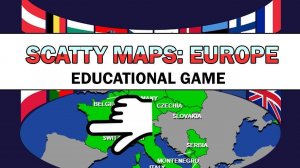
Europe Map Puzzle Game presents a blank outline of Europe. Around the screen, country shapes are scattered randomly. Your task is to drag each shape to its correct position on the outline. When a country is placed correctly, it locks into the map and the outline gradually fills. There is no timer by default, so you can work at your own pace. A hint system is available if you are unsure where a country belongs, and mistakes carry no penalty—you can try as many times as needed.
How the Map Fills In
The game uses a simple visual feedback loop. Every correct placement adds another piece to the map, so progress is always visible. This makes the puzzle feel rewarding without needing scores or levels. Because the map is built from individual country shapes, you learn both the shape and the relative position of each nation. The lack of time pressure means the focus stays on recognition and memory rather than speed.
Controls and Accessibility
Only a mouse or touch input is required. Click or tap a country shape, drag it toward the outline, and release when it is over the correct spot. The interface is clean and uncluttered, which keeps attention on the map. This control scheme works on both desktop and mobile devices, so you can play in a browser without installing anything.
Who This Is For
The game is designed for anyone who wants to improve their knowledge of European geography in a stress-free environment. Children, students, and adults can all use it. It suits test preparation, casual curiosity, or a short focused study session. The gentle learning curve and absence of penalties make it approachable for beginners, while the option to track completion time gives more confident players a way to challenge themselves.





Editorial Notes