Patty Station Order Manager
Reviews
Patty Station Order Manager keeps its scope narrow: read a ticket, build the burger, serve it correctly, and hit the day's target. That simplicity is also its main limitation, since there is no hint of multiplayer, story, or complex upgrade systems in the source material. Players who enjoy short, repeatable accuracy challenges with rising goals will get the most from it, while those seeking deeper simulation mechanics may find the loop thin.
Description
Reading the Order Ticket
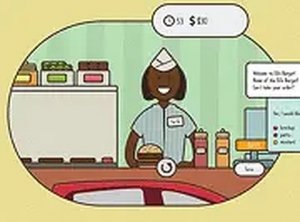
Every customer request appears at the top of the screen as a list of ingredients: patties, cheese, lettuce, tomato, and sauces. Your job is to match that list exactly. The order ticket is the only source of truth, so the first skill the game asks for is careful reading rather than fast clicking. A wrong ingredient means the order is incorrect, and that has a direct cost.
Assembling and Serving
Below the ticket sits a set of ingredient options. You click each component to add it to the burger, building the sandwich one layer at a time. Once the burger matches the request, you serve it to the waiting customer. A correct delivery clears the order and adds to the day's earnings. An incorrect one loses income and leaves the patron unhappy, so accuracy and speed pull against each other in every ticket.
Daily Targets and Tips
Each in-game day sets a financial target you must reach through completed orders. That target rises gradually, which pushes you to reduce mistakes and work faster. Quick service earns tips on top of the base payment, giving a clear reason to optimize your clicking rhythm rather than just your accuracy. The daily reset turns the game into a series of short, self-contained sessions: one objective, then a fresh start.
Controls and Visual Feedback
The game runs in a desktop browser and uses mouse input only. There are no keyboard shortcuts to learn. The interface keeps the current order, the ingredient selection area, and a running earnings total visible at once. After each delivery, feedback tells you whether the order was correct and how much time you spent. Bright colors, cheerful counter details, and distinct customer expressions keep the tone light. Coins that appear after a successful order reinforce correct play without cluttering the screen.









Editorial Notes